Python Code Quality Tools - Linters
Comparison of ruff, pylint, and flake8

Why Code Quality Tools?
I got into software development by making tools for analysts, developers and QA (and I still kinda do). I love dev tools, and my "dream" job would be working for a company that makes tools developers use around the world. I have a vague, unstructured goal of contributing to an open source project for a tool that I use regularly at work. Right now I'm at capacity for side projects, but I want to spend the latter half of the year learning about the dev tools out there in Python. I figured I'd start with the basics: code quality tools.
What are code quality tools? They're packages, extensions, and utilities that help developers improve the quality of their code. While code quality can seem subjective, there are established standards for what good quality code is, though teams will have different interpretations. I like the definition from this Real Python post:
Low-quality code: Has the minimal required characteristics to be functional.
High-quality code: Has all the necessary characteristics that make it work reliably, efficiently, and effectively, while also being straightforward to maintain.
This post goes into much more detail about what defines high vs. low quality code, with detailed examples.
When writing or updating code, it's best to follow these standards as you go... but humans aren't machines, and developers are lazy. Why do something manually when it can be done programmatically? Here's where code quality tools come in. There are a host of tools out there - some analyze security vulnerabilities, some measure complexity, others analyze dependencies. I'm starting with formatters, linters, and type checkers because they form the foundation that most Python developers use daily.
The PEP 8 style guide is widely adopted in open-source Python projects and is good practice to adopt if you're starting out - many of these tools help enforce or align with PEP 8 standards.
At first I planned to release one post explaining all the tools (formatters, linters, and type checkers), but my post on linters alone was getting out of hand. I'm doing a series instead where I explain what each tool does, compare the top available tools in Python with a sample code project, and pick my favorite! By no means am I saying these are the end all be all - just what I prefer.
For a look at the code I used to test these out, see my github repo. Let's start with linters.
What are linters?
Linters are tools that analyze source code to detect potential errors, security vulnerabilities, and coding style issues. They catch errors as you're writing or developing code, so you can fix them before introducing them to production. They enforce adherence to style guidelines (most default to PEP 8, but you can configure to your preference). Linters help teams maintain consistent code style, making codebases easier to read and maintain when multiple developers are involved.
What do linters catch?
Syntax Errors that violate constraints of the language
print("Hello world"
# Parsing failed: ''(' was never closed (test, line 2)' Pylint(E0001:syntax-error)
Unused Imports/Variables
import os
import sys

def get_current_path():
	test = 3
    return os.getcwd()
# `sys` imported but unused Ruff(F401)
# Local variable `test` is assigned to but never used Ruff(F841)
def get_state_tax_rate(self, state: str) -> float:
	"""Given a state, return the tax rate for that state as float.

	Arguments:
	state: str of state abbreviation

	Returns:
	float of tax rate

	"""
	mappings = {"MA": 0.05, "RI": 0.07}

	return mappings.get("state")
# Unused method argument: `state` Ruff(ARG002)
Undefined Variable
def calculate_total(items: list[Item]) -> float | int:
    """Calculate the total for all items in the list.

    Arguments:
    items: list of Item objects with attribute price

    Returns:
    sum total price for all items in list

    """

    for item in items:
        total += item.price  # 'total' used before assignment

    return total
# undefined name 'total' Flake8(F821)
Potential Bugs
class Cart:
    """Dummy class for cart of items."""

    now = datetime.now(timezone.utc)

    def __init__(
        self,
        user_id: str,
        items: list[Item] = [],
        created_on: datetime = now,
    ) -> None:
        """Initialize Cart class."""
        self.user_id = user_id
        self.items = items
        self.created_on = created_on
# Dangerous default value [] as argument Pylint(W0102:dangerous-default-value)
if user_input == user_input:
    print("Valid input")
# Name compared with itself, consider replacing `user_input == user_input` Ruff(PLR0124)
Style Violations (PEP 8)
def CalculateTax(price: float, rate: float) -> float:
	return price * rate
# Function name "CalculateTax" doesn't conform to snake_case naming style Pylint(C0103:invalid-name)
# Missing docstring in public method Ruff(D102)
Security Vulnerabilities
def get_user_by_id(self):
	query = f"SELECT * FROM users WHERE id = {self.user_id}"
	return self.cursor.execute(query)
# Possible SQL injection vector through string-based query construction Ruff(S608)
How to use linters
Linters can be used in several ways:
Code Editor
Your editor can install extensions that run linters as you code. I'm partial to VSCode, which has built-in extensions for the top Python linters (pylint, flake8, ruff). They're likely available on whichever editor you use (vim/neovim, emacs, PyCharm, Sublime, etc.).
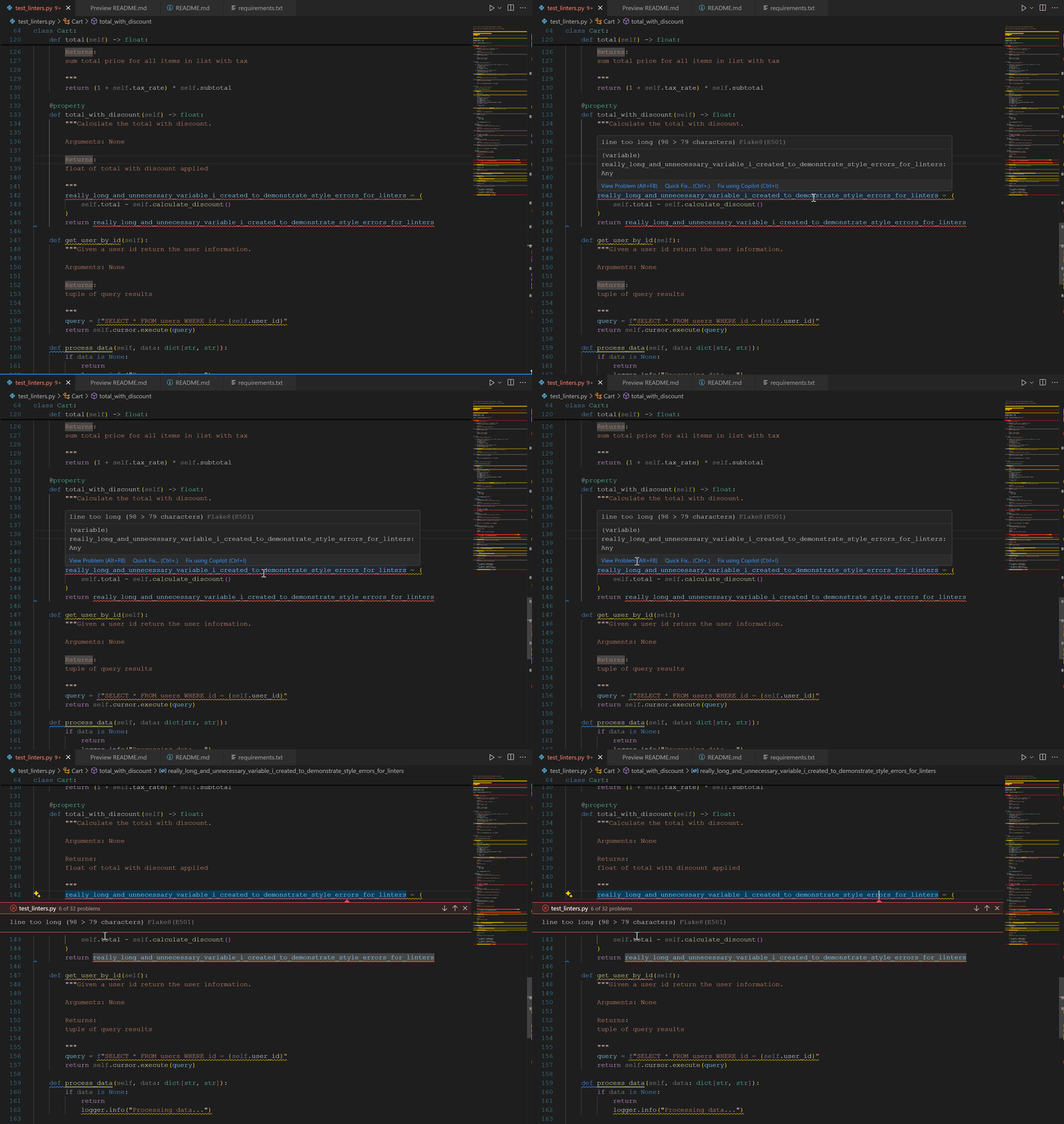
VSCode shows different colored squiggles under errors depending on the type. It includes a short explanation, which linter is raising the issue, and a link to documentation about why it's problematic. VSCode also has "Quick Fix" capability to fix issues inline.
Command Line
Linters can all be run on the command line. A simple pip install flake8 into your environment will install the package. You can also use pipx/uvx if you don't want to install it into your project but want to run the linter against it.
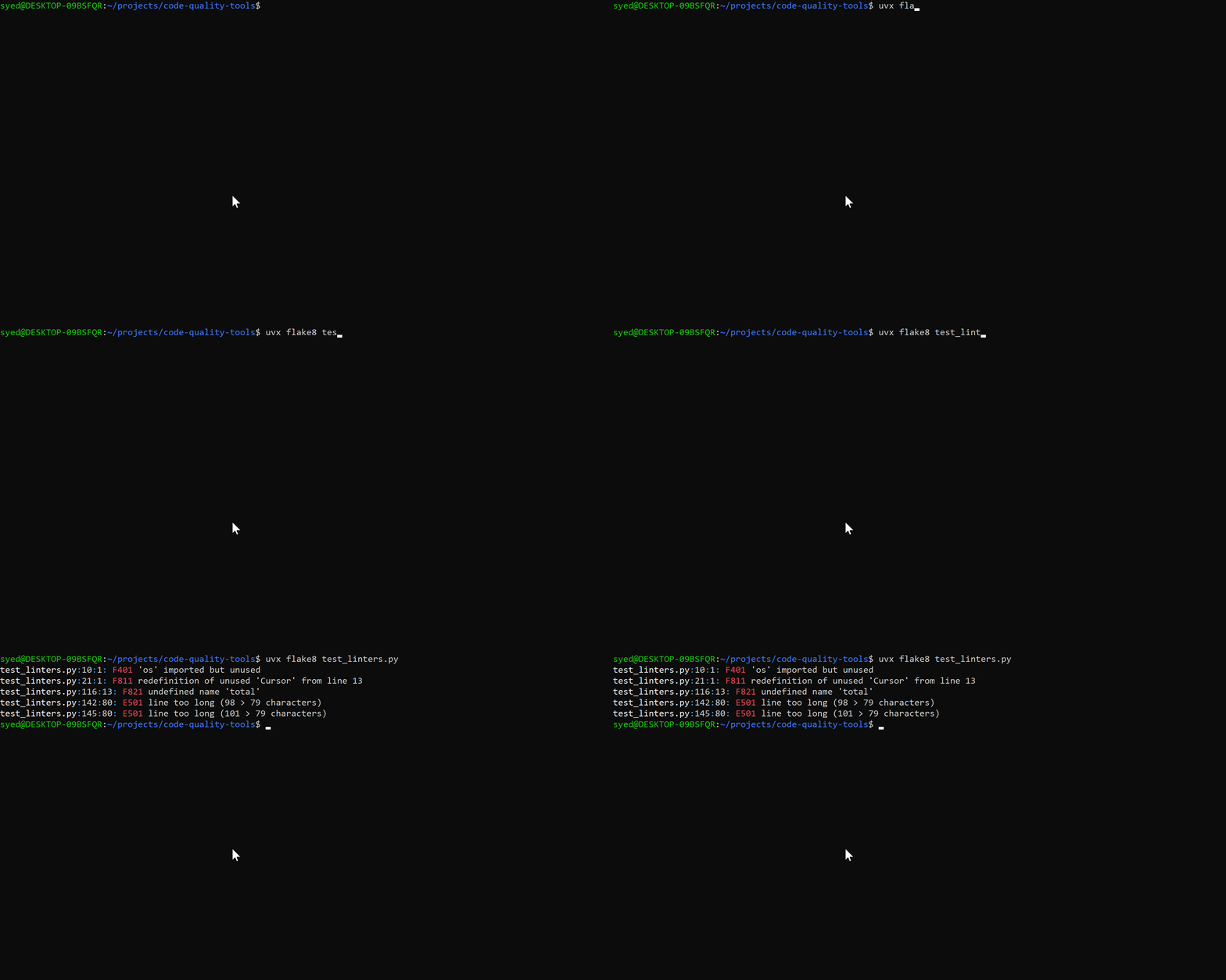
uvx flake8 test_linters.pyruns the linter on the file without changing the code, giving you output of what errors/warnings the linter found.
Pre-commit hook
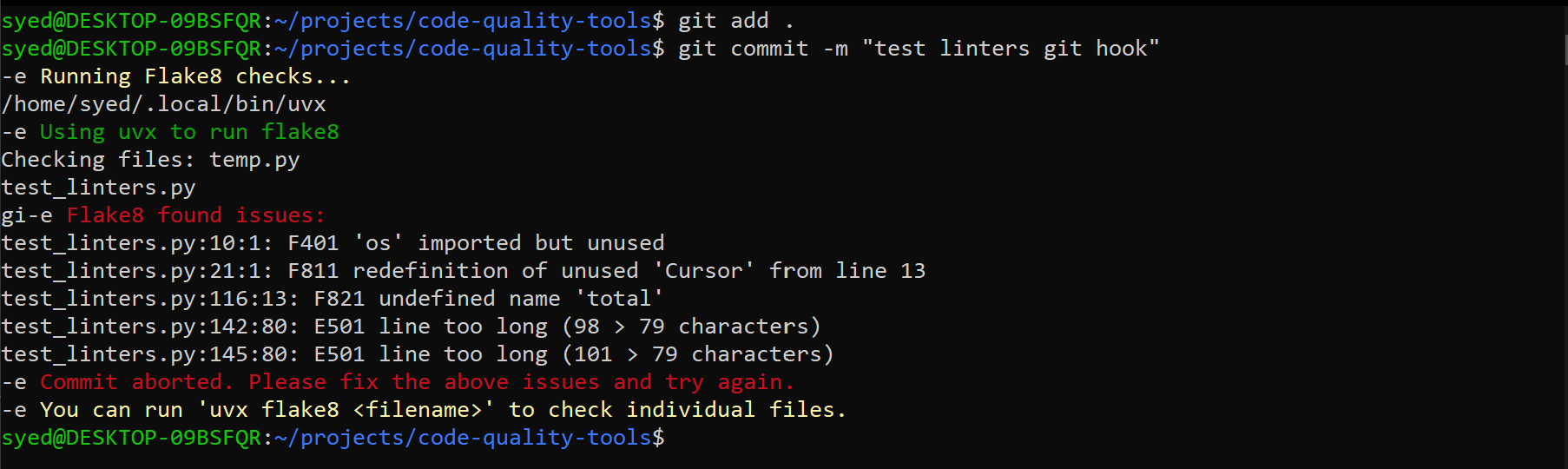
These tools prevent errors from making it into the codebase. A pre-commit hook runs the linter prior to your commit. If you have errors, the code isn't committed unless the linter passes all checks. For more information on git hooks, refer to this documentation.
CI (Continuous Integration)
Larger teams often integrate linting as part of CI. The linter runs on code on a server, and if the code passes the linting process, it's merged into the branch, packaged for release, or whatever limitation the team decides.
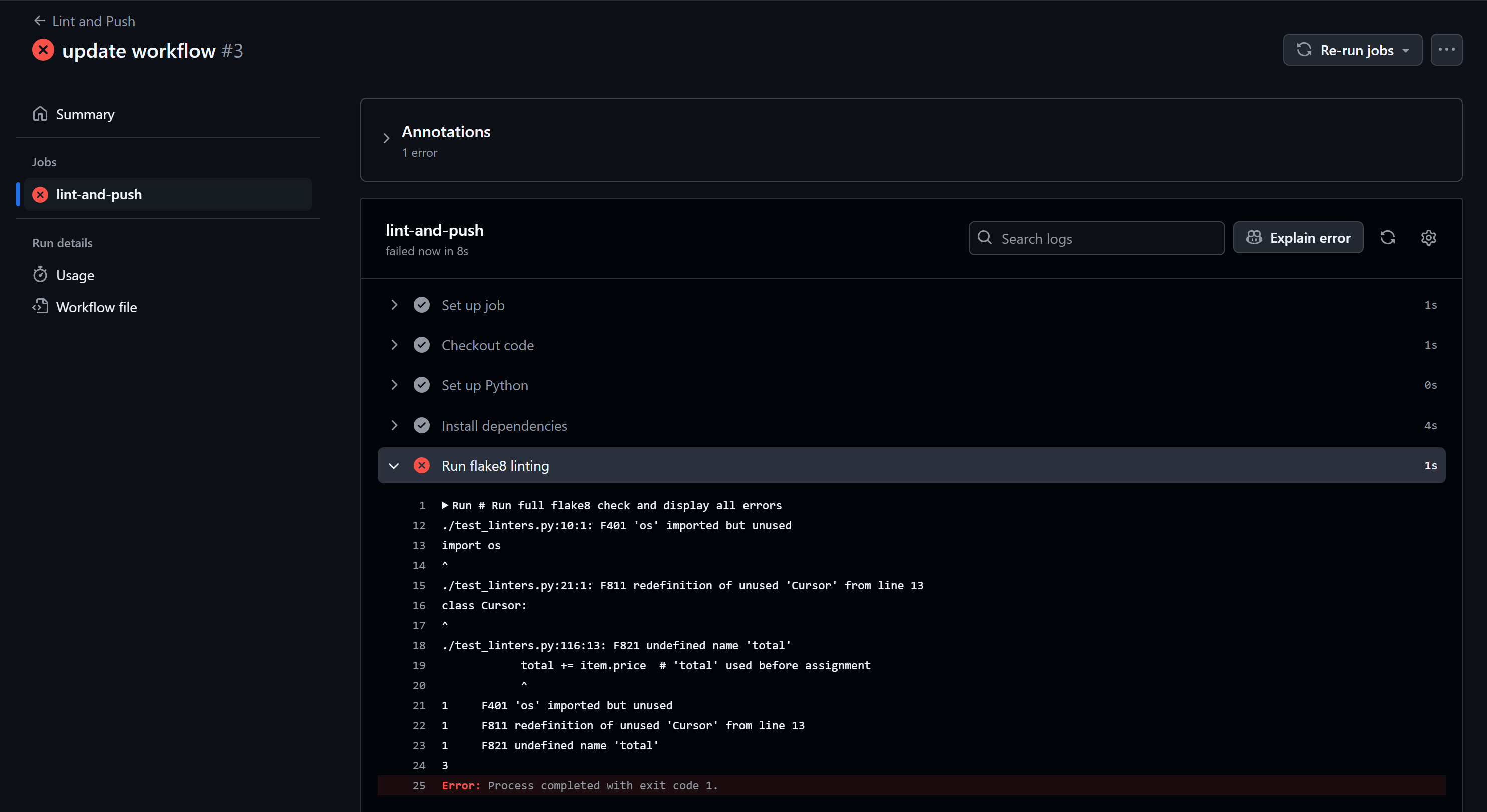
In the above screenshot I ran flake8 using GitHub Actions on my repo. For more information about GitHub Actions refer to this documentation.
Linters in Python
Python being Python, there's never one way to do things. Several linters exist that will tell you about problematic styling and conventions in your code. I decided to compare the top 3 linting tools: Ruff, Flake8, and PyLint. Each has a command line tool and VSCode extension.
In my test code test_linters.py, I deliberately introduced 16 errors, styling issues, and security problems. I wanted to compare what each could catch, how long they take to lint the file, and what the user experience is like.
Flake8
Flake8 is a part of the Python Code Quality Authority, which is an organization of people who maintain projects related to automatic style and quality reporting. Flake8 is a wrapper around these three tools:
pyflakes- finds bugs like unused imports and typos in variable namespycodestyle- checks if your code follows PEP 8mccabe- warns when functions are too complicated and hard to understand
As mentioned before, flake8 has a command line tool and VSCode extension. It can be configured either in the command line, or using a configuration file. One of the things that make flake8 so popular is the availability of plugins. Plugins have been made to enforce things outside of style guidance, like enforcing certain conventions for docstrings. Teams can configure plugins used exclusively by themselves, to enforce a certain style within a code base.
In my code test_linters.py flake8 was able to catch 5 of the 16 issues I deliberately introduced:
$ uvx flake8 test_linters.py
test_linters.py:10:1: F401 'os' imported but unused
test_linters.py:21:1: F811 redefinition of unused 'Cursor' from line 13
test_linters.py:116:13: F821 undefined name 'total'
test_linters.py:142:80: E501 line too long (98 > 79 characters)
test_linters.py:145:80: E501 line too long (101 > 79 characters)
The output points me to which line/character the issue occurs, and what the issue is, as well as the error code to look into for information in the documentation. One thing to note that in neither the cli tool or the VSCode extension is there any automatic links to the error code. This could be helpful if you want more details on what to do instead, but it's not available with flake8. Even the documentation only displays the same error message you get in the output. This is fine if you're an experience Python programmer, but I could see more details being helpful for newbies. That being said there is the site flake8rules which provides details and examples.
Flake8 didn't catch the issues in the import order, circular import, it also didn't care about the casing of my class/method/function names, or catch the security issues. But maybe it will catch these in the plugins.
Beyond the default behavior flake8 is easily configurable:
[flake8]
max-line-length = 100
ignore = F401
exclude = .git,__pycache__
Pasting the above in a .flake8, setup.cfg, or tox.ini does the following:
increases the maximum allowable characters for
E501 line too longerrorsignores the
F401 [module] imported but unusedexcluded running
flake8on.gitfiles and files in__pycache__
You might have different or more constrained opinions on the guidelines, and the flake8 configuration is simple enough to implement on a per project basis.
A lot of the issues that were missing from the default flake8 output above is available through plugins. There are a host of plugins available that enforce different rules. I tried out the most populate ones:
flake8-docstrings- Enforces PEP 257 docstring conventions and checks for missing documentationflake8-import-order- Enforces consistent import sorting and grouping by typeflake8-bugbear- Catches common Python bugs and anti-patterns that core tools missflake8-comprehensions- Suggests more efficient list/dict comprehensions and generator expressionsflake8-bandit- Scans for common security vulnerabilities and unsafe coding practices
$ uvx --with flake8-docstrings \
   --with flake8-import-order \
   --with flake8-bugbear \
   --with flake8-comprehensions \
   --with flake8-bandit \
   flake8 test_linters.py
test_linters.py:9:1: I100 Import statements are in the wrong order. 'import logging' should be before 'from datetime import datetime, timezone'
test_linters.py:10:1: F401 'os' imported but unused
test_linters.py:21:1: F811 redefinition of unused 'Cursor' from line 13
test_linters.py:73:29: B006 Do not use mutable data structures for argument defaults.  They are created during function definition time. All calls to the function reuse this one instance of that data structure, persisting changes between them.
test_linters.py:116:13: F821 undefined name 'total'
test_linters.py:142:80: E501 line too long (98 > 79 characters)
test_linters.py:145:80: E501 line too long (101 > 79 characters)
test_linters.py:156:1: S608 Possible SQL injection vector through string-based query construction.
test_linters.py:159:1: D102 Missing docstring in public method
With the addition of these plugins, flake8 was able to catch 8 out of the 16 issues I introduced. It still missed the of using a variable before assignment, missing type annotations, unreachable code, and variable not accessed.
There may be more plugins available that I haven't come across, and maybe with those it would enforce the other style and code issues I introduced. At first I did find it annoying that I need to add plugins to get the same functionality as other tools, but I do appreciate the flexibility of a core product with over a hundred plugins. Whatever things I care about, I can add on or build myself! which is an important feature for open source tools. For teams this can be great because there might be some rules you care about that differ between projects.
Pylint
Pylint is developed by the pylint-dev organization and is one of the most comprehensive Python static analysis tools available. Pylint is a standalone tool that provides extensive code quality checking through its integrated approach:
Static analysis engine - detects errors, potential bugs, and code smells without executing code
PEP 8 compliance checking - enforces Python style guide standards and coding conventions
Code complexity analysis - identifies overly complex functions, classes, and modules that may be hard to maintain
Import analysis - finds unused imports, circular dependencies, and import-related issues
Type checking support - integrates with type hints to catch type-related errors
Customizable rule engine - allows extensive configuration of checks and coding standards through plugins and extensions
Pylint performs a deeper static analysis than simpler linting tools. It can track variables across functions, understand code context, detect logical inconsistencies, and perform sophisticated program flow analysis. It's highly opinionated out of the box but extremely configurable, making it suitable for both strict enterprise environments and flexible development workflows.
Similar to flake8, pylint has a command line tool and VSCode extension. You can add flags to configure or make a configuration file that it reads from. One feature that doesn't exist in flake8 is that you can generate a config file from the command line:
$ uvx pylint \
    --disable=bare-except,invalid-name \
    --class-rgx='[A-Z][a-z]+' \
    --generate-toml-config > pylintrc.toml
This creates a TOML configuration file with the given configurations from the command line. The commands disable the bare-except and invalid-name issues that pylint raises, as well as adjusts the regex pattern for class names to only allow simple capitalized words.
In my code test_linters.py pylint was able to catch 11 of the 16 issues I deliberately introduced:
$ uvx pylint test_linters.py
************* Module test_linters
test_linters.py:145:0: C0301: Line too long (101/100) (line-too-long)
test_linters.py:13:0: W0406: Module import itself (import-self)
test_linters.py:21:0: E0102: class already defined line 13 (function-redefined)
test_linters.py:21:0: R0903: Too few public methods (1/2) (too-few-public-methods)
test_linters.py:51:4: C0103: Method name "PriceWithTax" doesn\'t conform to snake_case naming style (invalid-name)
test_linters.py:69:4: W0102: Dangerous default value [] as argument (dangerous-default-value)
test_linters.py:87:34: W0613: Unused argument 'state' (unused-argument)
test_linters.py:159:4: C0116: Missing function or method docstring (missing-function-docstring)
test_linters.py:162:12: W0101: Unreachable code (unreachable)
test_linters.py:179:8: W1203: Use lazy % formatting in logging functions (logging-fstring-interpolation)
test_linters.py:179:36: E0606: Possibly using variable 'discount' before assignment (possibly-used-before-assignment)
test_linters.py:10:0: W0611: Unused import os (unused-import)

-----------------------------------
Your code has been rated at 6.49/10
Similar to flake8, the output points to the line/character where the issue occurs, along with the error code and a descriptive message. What sets pylint apart is its comprehensive error messages and the overall code quality score it provides at the end. While the command line output doesn't link to documentation, the VSCode extension will send you directly to the pylint documentation for each issue.
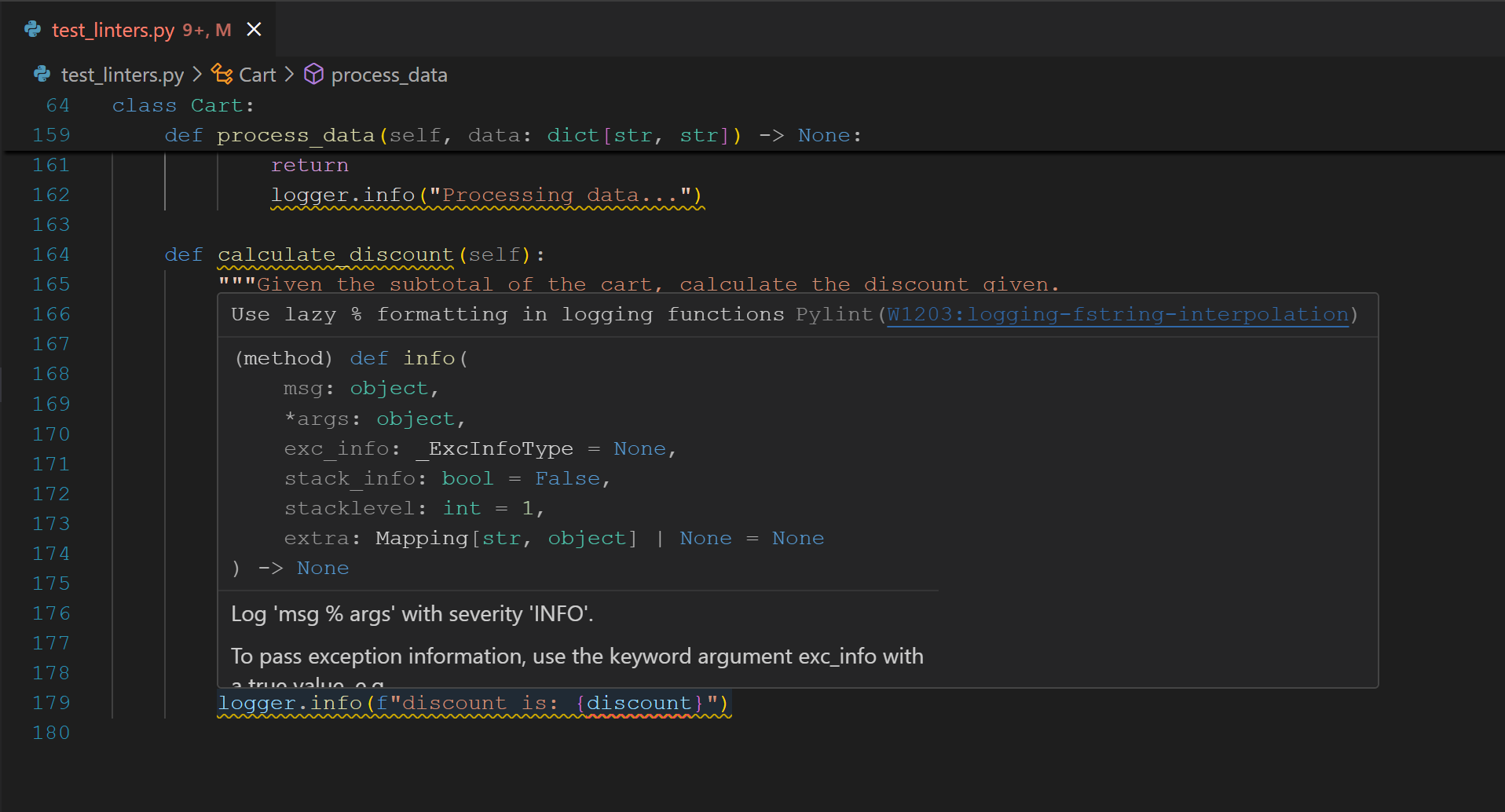
The link here sends you to pylint site for the specific error code (W1203), complete with examples of both problematic and correct code.
The issues pylint missed were mostly related to import ordering, some security vulnerabilities (like SQL injection patterns), and a few docstring convention violations that would require additional plugins to catch.
Pylint's configuration is highly flexible and can be done through multiple file formats:
[tool.pylint.messages_control]
disable = ["C0103", "W0102"]

[tool.pylint.format]
max-line-length = 100

[tool.pylint.basic]
good-names = ["i", "j", "k", "ex", "Run", "_", "id"]
This configuration does the following:
Disables specific warnings (invalid-name and dangerous-default-value)
Increases the maximum line length to 100 characters
Allows certain short variable names that would normally trigger naming warnings
Unlike flake8, pylint comes with extensive built-in checks and doesn't rely heavily on plugins. However, it does support extensions for specialized checking like pylint-django for Django projects or pylint-flask for Flask applications:
$ pip install pylint-django
$ uvx --with pylint-django pylint --load-plugins=pylint_django myproject/
One thing that makes pylint particularly powerful for teams is its ability to generate detailed reports and metrics. These are built into the command line tool. You'll notice in the output from the command line a score is written at the end:
Your code has been rated at 6.49/10Pylint has options to get more detailed reporting for how it determines this score:
$ uvx pylint --reports=y --score=y test_linters.pyThis command does the following:
--reports=y: enables comprehensive statistical reports with details about the code--score=y: shows the numerical quality score with score breakdown and comparison to previous runs
The output looks like this:
$ uvx pylint --reports=y --score=y test_linters.py
************* Module test_linters
test_linters.py:145:0: C0301: Line too long (101/100) (line-too-long)
# normal pylint output
...
Report
======
57 statements analysed.

Statistics by type
------------------

+---------+-------+-----------+-----------+------------+---------+
|type     |number |old number |difference |%documented |%badname |
+=========+=======+===========+===========+============+=========+
|module   |1      |1          |=          |100.00      |0.00     |
+---------+-------+-----------+-----------+------------+---------+
|class    |3      |3          |=          |100.00      |0.00     |
+---------+-------+-----------+-----------+------------+---------+
|method   |12     |12         |=          |91.67       |8.33     |
+---------+-------+-----------+-----------+------------+---------+
|function |0      |NC         |NC         |0           |0        |
+---------+-------+-----------+-----------+------------+---------+
# more detailed reports about error messages per category, duplication, etc.
...
------------------------------------------------------------------
Your code has been rated at 6.49/10 (previous run: 6.49/10, +0.00)
This detailed reporting is particularly useful for CI pipelines and setting quality gates. You can use --fail-under=8.0 to fail builds if code quality drops below a threshold, or --jobs=4 to speed up analysis on large codebases using parallel processing.
As you fix the code, you can work towards improving the score. After fixing a few errors here is the result:
$ uvx pylint --reports=y --score=y test_linters.py
...
------------------------------------------------------------------
Your code has been rated at 7.07/10 (previous run: 6.49/10, +0.58)
Having that comparison is a great sanity check to ensure fixes are actually addressing the errors and that you're not introducing new ones. This scoring system makes pylint excellent for tracking code quality improvements over time.
While pylint is more comprehensive than flake8, it's also slower due to its deeper analysis (more on this later). The trade-off is worth it for teams that want metrics to measure code quality. There are many more advanced features available, and the best place to explore them is the pylint documentation.
Ruff
Ruff is a code linter and formatter for Python, written in Rust by the team at astral. Their focus is on "next generation python tooling", and are the team behind uv and ty. The big difference between the tooling they offer and what's already out there is speed. I will say, as a uv user, even switching over to managing environments with uv, it was significantly faster than pip. Knowing how fast it was, I had to try out ruff as a linter too!
Ruff is designed as a comprehensive linting solution that combines the functionality of multiple tools:
Multi-tool replacement - replaces Flake8, isort, pydocstyle, pyupgrade, autoflake, and dozens of Flake8 plugins
Rust-powered performance - 10-100x faster than equivalent Python tools
800+ built-in rules - covers style, bugs, complexity, security, and modernization
Auto-fixing capabilities - automatically fixes many detected issues
Import sorting - sophisticated import organization built-in
One thing to note, ruff is also a formatter. I will talk about formatting tools in another post, but this one is about ruff as a linter. Similar to flake8 and pylint, there is a command line tool and VSCode extension available. Like Flake8 and pylint, ruff is configurable in the command line and a .ruff.toml file, making it easy to have different configurations per project.
To use ruff as a linter only, I used this command:
$ uvx ruff check test_linters.pyOne thing that sets ruff apart from the others is that in the command line, it doesn't just output the line/character number of where it's getting errors, it prints out and points out where in the code the issue is exactly. Because of this I'm showing an abbreviated output below:
$ uvx ruff check test_linters.py
test_linters.py:6:1: I001 [*] Import block is un-sorted or un-formatted
 5 |
 6 | / from __future__ import annotations
 7 | |
 8 | | from datetime import datetime, timezone
 9 | | import logging
10 | | import os
11 | |
12 |
13 | | from test_linters import Cursor
   | |_______________________________^ I001
14 |
15 |   DISCOUNT_LIMIT_1 = 100
   |
   = help: Organize imports
...
test_linters.py:73:29: B006 Do not use mutable data structures for argument defaults
   |
71 |         user_id: str,
72 |         state: str,
73 |         items: list[Item] = [],
   |                             ^^ B006
74 |         created_on: datetime = now,
75 |     ) -> None:
   |
   = help: Replace with `None`; initialize within function
...
test_linters.py:179:21: G004 Logging statement uses f-string
    |
177 |             discount = 15 + 0.05 * self.subtotal
178 |
179 |         logger.info(f"discount is: {discount}")
    |                     ^^^^^^^^^^^^^^^^^^^^^^^^^^ G004
    |

Found 16 errors.
[*] 2 fixable with the `--fix` option (4 hidden fixes can be enabled with the `--unsafe-fixes` option).
The visual output is incredibly helpful - you can see exactly where the issue occurs in context, and the [*] indicator shows which errors can be automatically fixed. On top of autmoatically fixing, ruff also provides helpful suggestions in the = help: sections. This is really helpful for a beginner to understand why their code violates the rules.
From the output it looks like ruff was able to identify 15 of the 16 errors that I initially introduced. After going through the errors in detail, it actually missed one of the errors, and identified another one. You can see in the output above that the last error is Logging statement uses f-string, which I did not realize was problematic in any way. Similar to pylint, the VSCode extension links you to the error in their documentation, with an explanation of why this is problematic. The actual issue in this code is that the variable discount is potentially being used before it's assigned, since its assignment was wrapped in if statements. Pylint was able to catch that but ruff missed it.
Ruff can also fix the issues it finds automatically, which is something not available in pylint and flake8.
$ uvx ruff check --fix test_linters.pyThis command will automatically resolve fixable issues like import sorting, removing unused imports, and updating deprecated syntax. The [*] indicator in the output shows which errors can be automatically fixed.
Like flake8 and pylint, ruff is highly configurable through a ruff.toml file, pyproject.toml, or command line arguments:
[tool.ruff]
line-length = 100
target-version = "py311"

[tool.ruff.lint]
select = [
    "E",   # pycodestyle errors
    "W",   # pycodestyle warnings
    "F",   # pyflakes
    "I",   # isort
    "B",   # flake8-bugbear
    "S",   # flake8-bandit (security)
]
ignore = ["E501", "B006"]  # line too long, mutable defaults
exclude = [".git", "__pycache__", ".venv"]
This configuration sets the line length to 100 characters, enables multiple rule sets covering style and security checks, and ignores specific rules that might be too strict for the project.
Ruff organizes its rules into logical groups based on the tools they replace (E/W for pycodestyle, F for pyflakes, B for bugbear, S for security, etc.), making it easy to enable your desired checks. And since it's written in Rust, it is seriously fast, both in linting the code and automatically fixing. Other tools might take a few seconds, but ruff can do it all under a second. This is a key advantage of using ruff in a development environment when you want quick feedback.
How they compare
After trying out all three tools, I can see the benefits of using each. Flake8 for flexibility, pylint for broad coverage and reporting tools, ruff for speed and ease of use. Regardless of which one you choose, configuration and plugins can achieve similar results.
Earlier I mentioned how fast ruff is compared to the others, but I wanted to give actual stats. Using the time command in bash, I can determine how long each program takes to lint the same file. Here are the results:
flake8: 0.377sflake8with all the plugins: 0.832spylint: 2.685spylintwith score calculation: 2.737sruff: 0.063sruffwith fix: 0.082s
The results are as expected, with ruff being the fastest, and pylint being the slowest. The main reason for this is that pylint and flake8 are built with python which is interpreted, whereas as ruff is built with Rust, which is compiled. I don't know the in's and outs of why that makes Rust faster than Python, but it boils down to compiled languages are already translated into machine code, whereas interpreted ones have to be converted line by line (might write more on this later). Pylint and Flake8 longer because they're written in Python, but they offer tooling that isn't (currently) available in ruff. They both offer extensive plugins and customizability, as well as tools for specific frameworks (Django, Flask, SQLAlchemy).
Which one should you use?
When it comes to making a decision on which one to use, it really comes down to preference and trying it out for your specific use case. What works for me might not be what's best for your setup. Here are some guidelines that can help you:
Choose Flake8 when:
you need customization
you're working with specific frameworks (Django, Flask, SQLAlchemy, etc.) that have plugins
you want minimal focused linting
you prefer stability and longevity in the products you use
Choose Pylint when:
you want detailed analysis and reporting
code quality metrics are measured on your team/organization
you're working on a large code base where deeper analysis is needed
you prefer detailed explanations
you have or want strict coding standards enforced
Choose Ruff when:
you prioritize speed
you want linting and formatting in one tool
you're starting a new project without linting setup
you want auto-fixing
you don't have a need for extensive customization (i.e. you like standard defaults)
My Personal Favorite
For me personally, my favorite tool to use is ruff. It's crazy fast, catches most of the issues out of the box without additional configuration, can be configured, and can implement automatic fixes for the code. Additionally, it has a formatter in the package as well, and although that isn't the purpose of this post (will write more on that later), it's always nice to have one less tool to remember. My suggestion is, if you're working on something new, start with ruff. On older code bases it might be cumbersome to implement changes to align with ruff all at once.
My favorite way to implement this tool is either in the command line or the as pre-commit hook. I don't love the VSCode extensions because they can be a bit annoying when developing. I prefer to write the code, and then fix issues after. Having the command line output that ruff offers makes it clear where in the code to make the fixes, and the explanations even give hints on how to fix it. Having it in a per-commit hook forces me to fix issues before introducing them to my history.
What I like about astral (the company behind ruff), is their attempt to make a one-stop-shop for Python tooling. In other languages there aren't 1 millions ways and tools to do things, and there is strict enforcement in how the language works out of the box. Python, for better or for worse, doesn't have that. As a result there are many ways to write your code, and as such, several different ways to lint it. Pylint, Flake8, and Ruff are three popular linters that are available, but there are others that could be worth checking out. For now, I’m sticking to ruff.